How it works
Weigh in, then let the numbers settle.
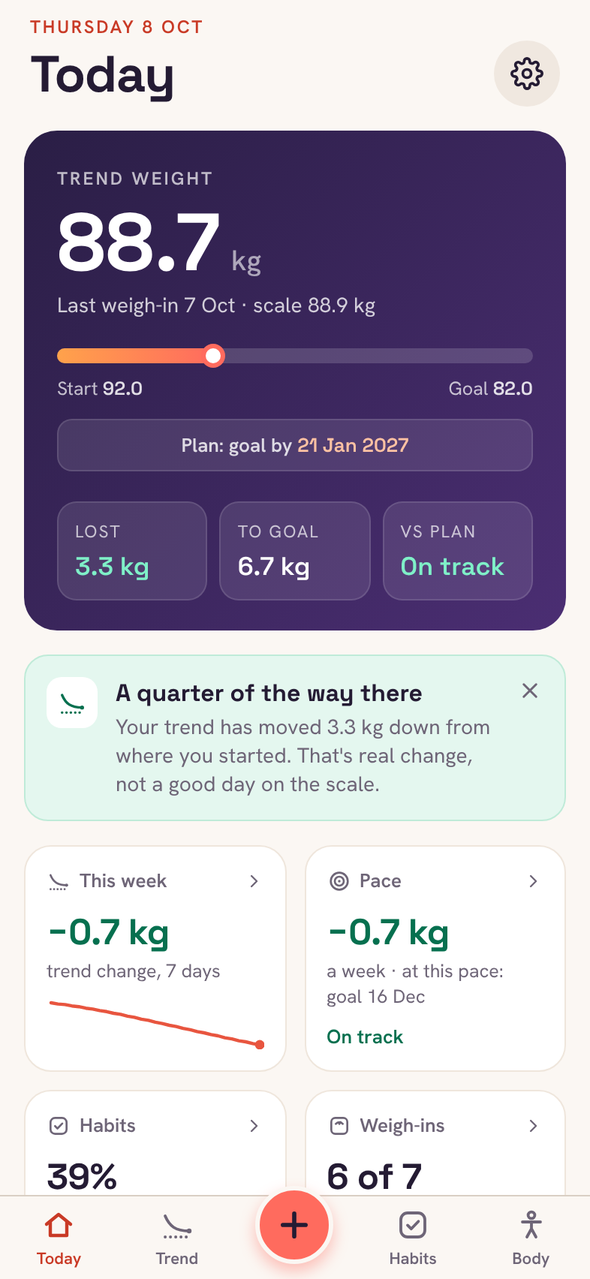
Today, at a glance
Your trend weight, how far you’ve come and this week’s pace. Logging opens on your last weight, so it’s a tap or two.
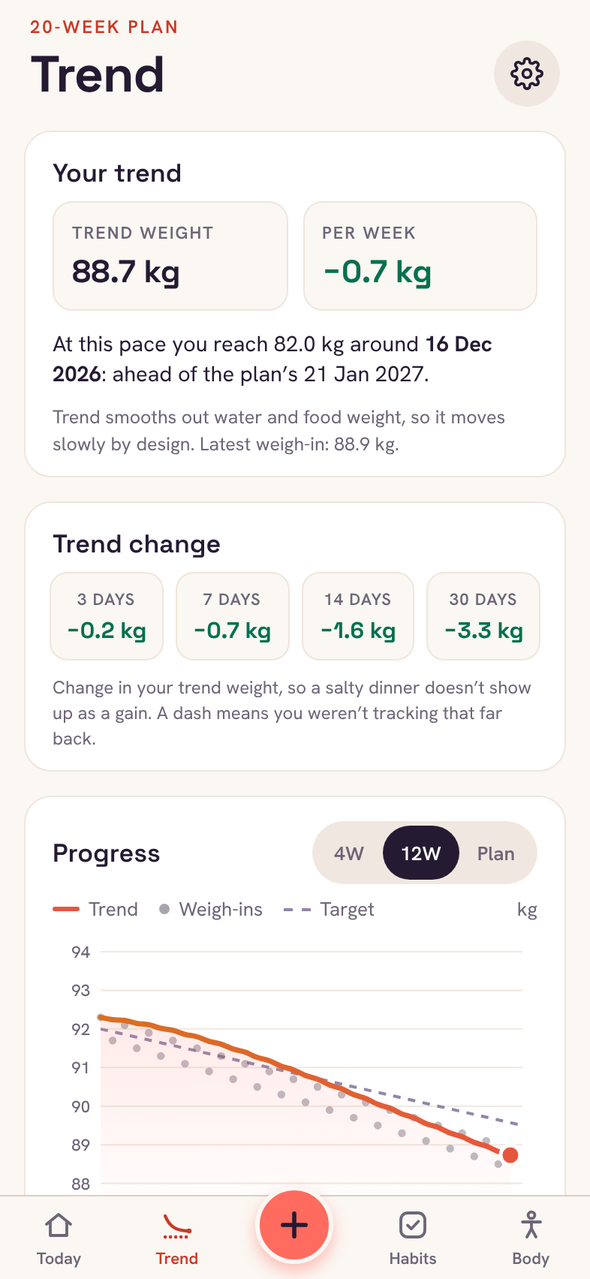
The trend, against your plan
See the line you’re on and the one you planned. When a weigh-in jumps, it tells you why that’s normal.
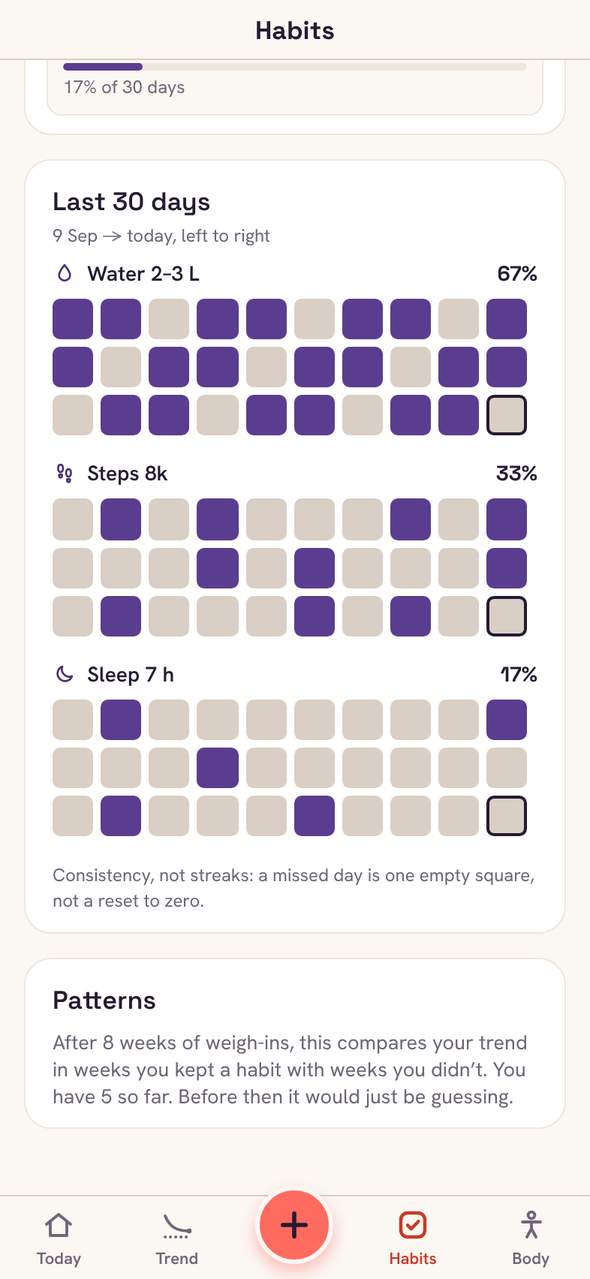
Habits, without streaks
Tick off the few things that help, like water or a walk. Thirty-day grids show consistency, and a missed day doesn’t reset anything.
Free and Plus
Free does the job. Plus adds the extras.
Tidemark
Free
- Trend weight, weekly rate and your plan
- Chart, change table and full history
- Up to 3 daily habits
- Weigh-in reminders and Face ID lock
- Backups and CSV export
Tidemark Plus
£1.99 a month
or £11.99 a year, or £19.99 once. Monthly and yearly start with 7 days free.
- Medication log and dose reminders, for weekly GLP-1 injections or anything else you take
- Up to 6 habits
- Measurements and private progress photos
- Calories, and an estimate of what you really burn
- Password-protected backups
UK prices. Plus is bought through Apple, and the App Store shows the price in your own currency. Anything you enter in a Plus feature is kept if Plus ends, and comes back if you return.
Private by design
Your weight is nobody’s business but yours.
- No account
- There’s nothing to sign up for and no password to forget.
- No server
- Everything you enter is kept on your iPhone, encrypted by iOS while it’s locked.
- Nothing collected
- No analytics, no ads, no tracking. On the App Store, Tidemark’s privacy label is “Data Not Collected”.
Support
Questions people ask.
How do I move my data to a new iPhone?
If you restore your new iPhone from an iCloud or computer backup of the old one, Tidemark comes with it. Or, in Tidemark on the old phone, go to Settings → Export backup, save the file somewhere you can reach from the new phone, then use Settings → Restore from backup there.
What happens if I lose my phone?
Your data is only on your phone, so a backup is what gets it back. Tidemark reminds you to make one and shows when you last did. You can lock a backup with a password, so only you can open it.
Why does my weight jump around so much?
A day’s weight moves with water, salt, sleep and what you last ate, often by a kilo or more. That’s why Tidemark shows a trend: one high reading moves it a little, and only a real change moves it a lot.
How do I cancel Plus?
On your iPhone, open Settings, tap your name, then Subscriptions, then Tidemark. You can also get there from Tidemark’s Settings → Manage subscription. Cancel at least 24 hours before the renewal date to avoid the next charge.
Can I get a refund?
Apple handles all payments, so refunds go through Apple: visit reportaproblem.apple.com and sign in with your Apple ID. We can’t see or refund purchases ourselves.
I bought Plus but it isn’t showing.
Open Tidemark’s Settings → Restore purchases, signed in with the same Apple ID you bought it with. Plus works on any iPhone signed in to that Apple ID.
Does Tidemark give medical advice?
No. Its targets, trends and calorie estimates are general guidance from the numbers you enter, and the medication log only records what you take. Talk to your GP, pharmacist or prescriber about your treatment, especially if you’re pregnant or have a health condition.
Something isn’t working.
If Tidemark shows an error, tap “Email the error to support” on that screen: it fills in the error and the app version, and you see the email before it’s sent. Otherwise, email us and say what you were doing when it happened.
Still stuck?
Email yameen@ysbdesigns.uk. You’ll hear back from the person who builds Tidemark.
Privacy policy
How Tidemark handles your data
Last updated 8 October 2026
Who runs Tidemark
Tidemark is made by YSB Ventures Ltd (registered in England and Wales, company number 16022339), which is responsible for this policy. Because Tidemark keeps your data on your phone, we never hold it: the only personal information we see is an email you choose to send us.
What Tidemark stores
Your plan, weigh-ins, habit ticks, measurements, calorie numbers, session weights, progress photos and, if you use it, the medication you track and the doses you mark as taken. If you stop tracking medication, Tidemark asks whether to keep or delete your dose history. All of it is stored only on your device, inside Tidemark’s private storage. Progress photos are kept inside the app and are never added to your photo library.
What Tidemark sends
Nothing. Tidemark has no analytics, no advertising, no tracking and no third-party SDKs that collect data. It doesn’t need an internet connection to work.
Permissions
- Face ID / Touch ID (optional) locks the app. The check is done by iOS; Tidemark never sees your face or fingerprint data.
- Camera and photos (optional) are used only when you add a progress photo. The photo is copied into Tidemark’s private storage.
- Notifications (optional) are used only for the daily weigh-in reminder and, if you turn it on, a dose-day reminder. Both are scheduled on your phone.
Backups and exports
When you tap Export, Tidemark creates a file and opens the iOS share sheet. Where that file goes (Files, iCloud Drive, email) is your choice, and it is then handled by that service. Photos are not included in backups.
How your data is protected
- Tidemark’s storage uses iOS’s strongest file protection: while your iPhone is locked, its data is encrypted and can’t be read, even by Tidemark.
- With the optional lock on, Tidemark asks for Face ID (or your passcode) every time you come back to it.
- The app switcher shows a blank Tidemark screen, never your numbers.
- Reminders never show a weight, a medication name or any other detail on your lock screen, just a nudge.
- Backups can be locked with a password (XChaCha20-Poly1305 encryption, key derived with scrypt). Without the password the file can't be read, by anyone, including us. A backup saved without a password, and the CSV spreadsheet, are plain text, so keep those somewhere private. Export files are deleted from Tidemark as soon as the share sheet closes.
Device backups
If you use iCloud Backup or back up your iPhone to a computer, iOS includes Tidemark’s data in that backup, as it does for every app. This is controlled by your iPhone settings, not by Tidemark.
Deleting your data
Tidemark has no account, so there is no account to delete: all your data is on your phone. Settings → Delete all my data removes all of it, photos included, immediately and permanently. Deleting the app also deletes it. Nothing is held anywhere else, so there is nothing for us to delete on a server.
Your rights
Weight, medication and body measurements are health data, which UK data protection law treats with extra care. That's the reason Tidemark keeps them only on your phone, where you control them. If you email us, we use your email only to reply, because we have a legitimate interest in helping you, and we delete it once your question is dealt with. You can ask us what we hold about you (normally nothing beyond that email), or ask us to delete it, at the address below. If you're unhappy with how we've handled your information, you can complain to the Information Commissioner's Office at ico.org.uk.
Children
Tidemark isn’t directed at children under 13.
Changes and contact
If this policy changes, the new version will be posted on this page with a new date.
Tidemark Plus is bought through Apple. Apple handles the payment; Tidemark never sees your card, name or Apple ID, only whether this Apple ID has Plus, which it checks with the App Store on your phone and remembers there. There's still no account and nothing of yours leaves your phone.
If Tidemark ever hits an error, it can open an email to support with the error message and app version. Nothing is sent unless you choose to send that email, and it never contains your weights or other entries. Tidemark has no crash-reporting or analytics service.
Questions, support or a privacy request: email yameen@ysbdesigns.uk.
Not medical advice
Tidemark’s targets, trends and calorie estimates are general guidance worked out from the numbers you enter. They aren’t medical advice; talk to a GP or dietitian before big changes, especially if you’re pregnant or have a health condition.